Lang.NEXT 2012 is a cross-industry conference for programming language designers and implementers on the MIcrosoft Campus in Redmond, Washington. With three days of talks, panels and discussion on leading programming language work from industry and research, Lang.NEXT is the place to learn, share ideas and engage with fellow programming language design experts and enthusiasts. Native, functional, imperative, object oriented, static, dynamic, managed, interpreted... It's a programming language geek fest.
details: http://channel9.msdn.com/Events/Lang-NEXT/Lang-NEXT-2012
Wednesday, March 14, 2012

Monday, March 12, 2012
The new features available in Visual Studio 11 for web developers
If you're a web developer, Mads Kristensen and Jorge Gabuardi are about to be your new best friends. In this episode of Web Camps TV, Mads and Jorge introduce you to all the new features available in Visual Studio 11 for web developers. From the improved CSS editor to serious JavaScript improvements, a new set of color tools, and the brand new Page Inspector, Visual Studio 11 is loaded with new ways to enhance your web development experience.
Saturday, March 10, 2012

Thursday, March 8, 2012
Silverlight 5/Visual Basic: Add event handling code
- Modify from the last article "Hello Visual Basic Silverlight 5, using Microsoft Visual Studio 11 Ultimate Beta". Edit MainPage.xaml in XAML view to add property of Click="button1_Click", to specify the call-back function once the button clicked.
- Click the Design tab to switch to Design view, and double click on the button, to insert code of button1_Click() in MainPage.xaml.vb.

- Enter the code:
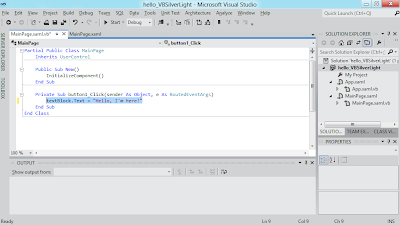
- Run it.

Next:
- Border of Silverlight
    <Grid x:Name="LayoutRoot" Background="White">
        <StackPanel>
            <TextBlock x:Name="textBlock" Text="Hello!"></TextBlock>
            <Button x:Name="button1" Click="button1_Click" Content="Click Me"></Button>
        </StackPanel>
    </Grid>
- Click the Design tab to switch to Design view, and double click on the button, to insert code of button1_Click() in MainPage.xaml.vb.

- Enter the code:
    Private Sub button1_Click(sender As Object, e As RoutedEventArgs)
        textBlock.Text = "Hello, I'm here!"
    End Sub

- Run it.

Next:
- Border of Silverlight
Wednesday, March 7, 2012
Hello Visual Basic Silverlight 5, using Microsoft Visual Studio 11 Ultimate Beta
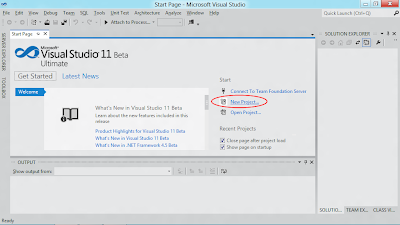
- Click New Project... in start-up page of Microsoft Visual Studio 11 Ultimate Beta.
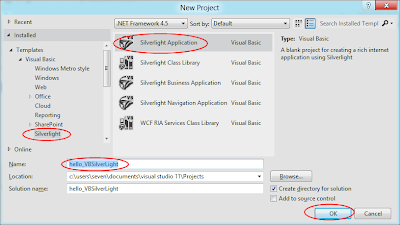
- Select template of Silverlight under Visual Basic, Silverlight Application with name of "hello_VBSilverLight". Click OK.
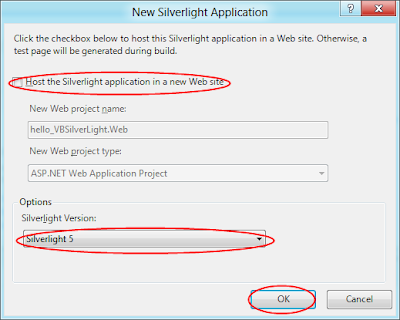
- Uncheck "Host the Silverlight application in a new Web site", select Silverlight Version of Silverlight 5, click OK.
- The application wizard will generate the start-up project for you.
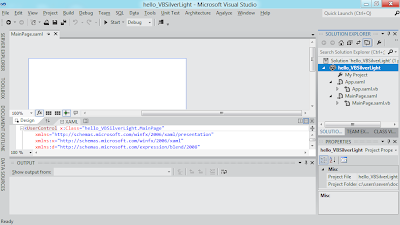
- Edit MainPage.xaml in XAML view - double click on the XAML tab to open XAML editor, we are going to insert something using XAML manually, instead of using graphical Design tool.
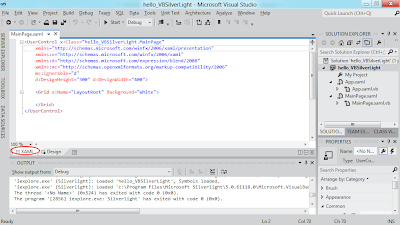
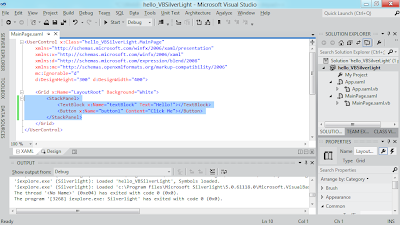
- Type in something inside the <Grid> element:
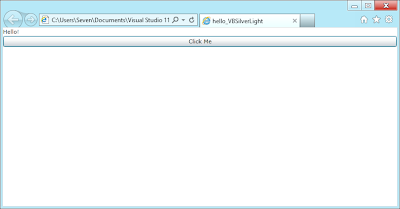
- Now, click the "Start" button. A browser will open and load your Hello World Silver 5 application.
Next:
- Silverlight 5/Visual Basic: Add event handling code

- Select template of Silverlight under Visual Basic, Silverlight Application with name of "hello_VBSilverLight". Click OK.

- Uncheck "Host the Silverlight application in a new Web site", select Silverlight Version of Silverlight 5, click OK.

- The application wizard will generate the start-up project for you.

- Edit MainPage.xaml in XAML view - double click on the XAML tab to open XAML editor, we are going to insert something using XAML manually, instead of using graphical Design tool.

- Type in something inside the <Grid> element:
<UserControl x:Class="hello_VBSilverLight.MainPage"
  xmlns="http://schemas.microsoft.com/winfx/2006/xaml/presentation"
  xmlns:x="http://schemas.microsoft.com/winfx/2006/xaml"
  xmlns:d="http://schemas.microsoft.com/expression/blend/2008"
  xmlns:mc="http://schemas.openxmlformats.org/markup-compatibility/2006"
  mc:Ignorable="d"
  d:DesignHeight="300" d:DesignWidth="400">

  <Grid x:Name="LayoutRoot" Background="White">
      <StackPanel>
          <TextBlock x:Name="textBlock" Text="Hello!"></TextBlock>
          <Button x:Name="button1" Content="Click Me"></Button>
      </StackPanel>
  </Grid>
</UserControl>

- Now, click the "Start" button. A browser will open and load your Hello World Silver 5 application.

Next:
- Silverlight 5/Visual Basic: Add event handling code
Cliplets - create imagery that sits between stills and video
A still photograph is a limited format for capturing a moment in time. Video is the traditional method for recording durations of time, but the subjective "moment" that one desires to capture is often lost in the chaos of shaky camerawork, irrelevant background clutter, and noise that dominates most casually recorded video clips.
Microsoft Research Cliplets is an interactive app that uses semi-automated methods to give users the power to create "Cliplets" -- a type of imagery that sits between stills and video from handheld videos. The app provides a creative lens one can use to focus on important aspects of a moment by mixing static and dynamic elements from a video clip.
Project Page: http://research.microsoft.com/en-us/um/redmond/projects/cliplets/
Microsoft Research Cliplets is an interactive app that uses semi-automated methods to give users the power to create "Cliplets" -- a type of imagery that sits between stills and video from handheld videos. The app provides a creative lens one can use to focus on important aspects of a moment by mixing static and dynamic elements from a video clip.
Project Page: http://research.microsoft.com/en-us/um/redmond/projects/cliplets/
Tuesday, March 6, 2012
Beginning Kinect Programming with the Microsoft Kinect SDK
Beginning Kinect Programming with the Microsoft Kinect SDK gets you up and running developing Kinect applications for your PC using Microsoft tools and the official SDK. You will have a working Kinect program by the end of the first chapter! The following chapters will open up the secrets of three-dimensional vision, skeleton tracking, audio through the Kinect, and more. Examples illustrate the concepts in the form of simple games that react to your body movements. The result is a fun read that helps you learn one of the hottest technologies out there today.
Beginning Kinect Programming with the Microsoft Kinect SDK also provides building blocks and ideas for mashing up the Kinect with other technologies to create art, interactive games, 3D models and enhanced office automation. You'll learn the fundamental code basic to almost all Kinect applications. You'll learn to integrate that code with other tools and manipulate data to create amazing Kinect applications. Beginning Kinect Programming with the Microsoft Kinect SDK is your gateway into the exciting world of three-dimensional, real-time computer interaction.
- Helps you create a proper development environment for Kinect applications.
- Covers the basics of three-dimensional vision, skeleton tracking, gesture recognition, and audio
- Provides fun examples that keep you engaged and learning
What you’ll learn
- Create a proper development environment
- Work with data streams from the Kinect sensor
- Use skeleton-tracking for interactive applications
- Build speech-aware applications
- Develop simple, Kinect-based games for the PC
- Learn the underlying math involved in three-dimensional programming
Who this book is for
Beginning Kinect Programming with the Microsoft Kinect SDK is for Microsoft developers who want to learn to program for the newest and coolest Microsoft input device. The book assumes familiarity, but not expertise, with WPF and C#. Developers will be able to use their current knowledge and experience with the Microsoft stack to build new types of applications that have never been possible before. Most of all, this book is for developers who want to go beyond simply creating data-entry applications and recapture the fun of creating software.
Table of Contents
- Getting Started with Kinect
- Application Fundamentals
- Depth Image Processing
- Kinect Skeletons
- Advanced Skeleton Tracking
- Kinect Gestures
- Speech
- Beyond the Basics
Subscribe to:
Posts (Atom)